
Pricing and fit: RetraceKit or Sentry for indie builders
Long-form breakdown of billing units, free tiers, paid plans, and who each tool fits — companion to the RetraceKit vs Sentry decision page.
Ildar Timerbaev
Need a 30-second pick? Use the RetraceKit vs Sentry decision page. This post is the longer pricing and fit write-up.
Sentry built the default mental model for error tracking. RetraceKit targets a smaller job: catch production crashes, group them into issues and incidents, and push a short brief through 3rd-party integrations.
If you ship alone, with a two-person team, or on a project that fits in one repo, surface area and bill shape drive the choice. You want errors you can act on. Tracing, session replay, logs, metrics, and profiling can wait until you use them.
Two pricing models
Compare units before you compare numbers.
Sentry meters errors you send each month. The free Developer plan includes 5,000 errors per month for one user. The Team plan starts at $26/month when billed annually and includes 50,000 errors, unlimited users, third-party integrations, and a broader monitoring stack (tracing, session replay, and more). Usage above the included quota bills at pay-as-you-go rates. Figures come from Sentry’s pricing page as of August 2026.
RetraceKit caps stored events per project. Free keeps 100,000 events with 7-day retention. Plus is $5.99/month for 200,000 events and 14 days. Pro is $14.99/month for 500,000 events and 30 days. Past the cap, older events drop first. The SDK keeps sending. You start without a card. Figures come from RetraceKit plans.
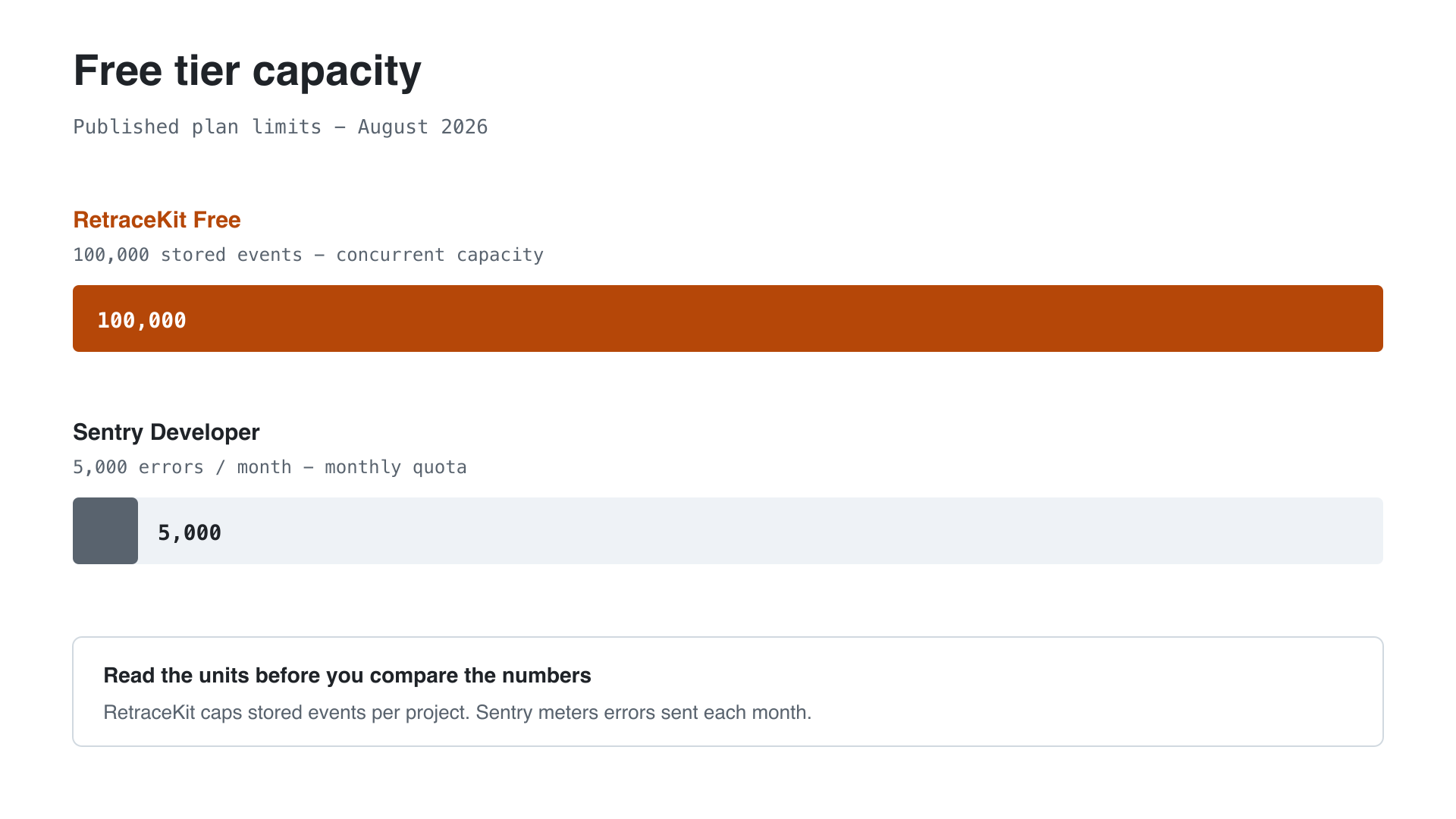
A pet project that throws a few thousand errors after a bad deploy can burn through a 5,000/month quota in a day. On RetraceKit Free, that spike fills storage, then FIFO trims the oldest rows. You lose history at the tail. You keep ingesting.
What you pay after free
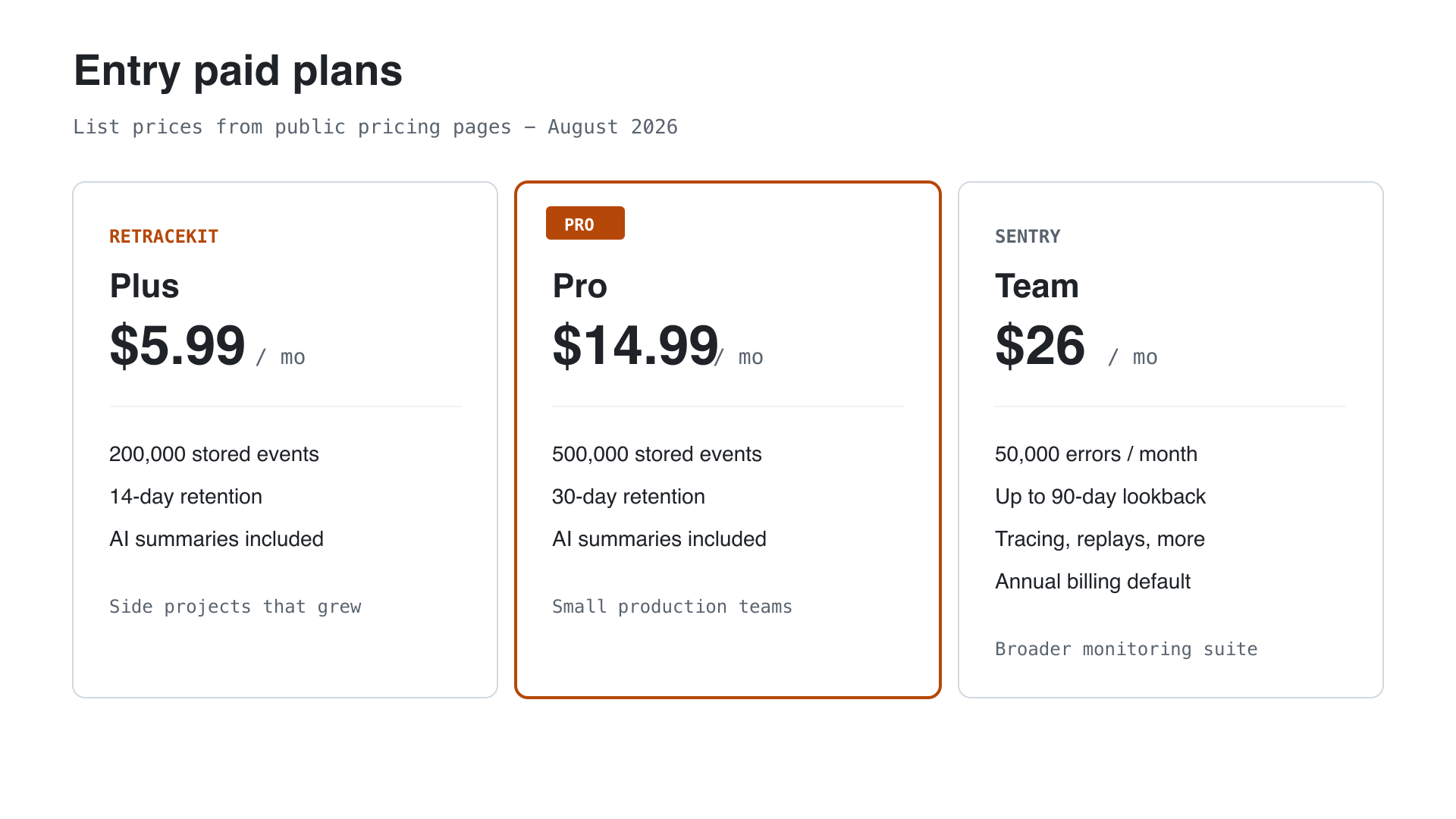
For an indie budget under $15/month, RetraceKit Plus or Pro covers error tracking, incidents, AI summaries, and 3rd-party integrations. Sentry Team at $26/month (annual) buys a wider platform: more product surfaces, longer lookback options, and a large integration catalog.
Pick the invoice that matches the tools you will open this quarter. Replay and profiling earn their keep when you debug with them. A weekend SaaS that needs stack traces and an alert ping can ship without those line items.
Product focus
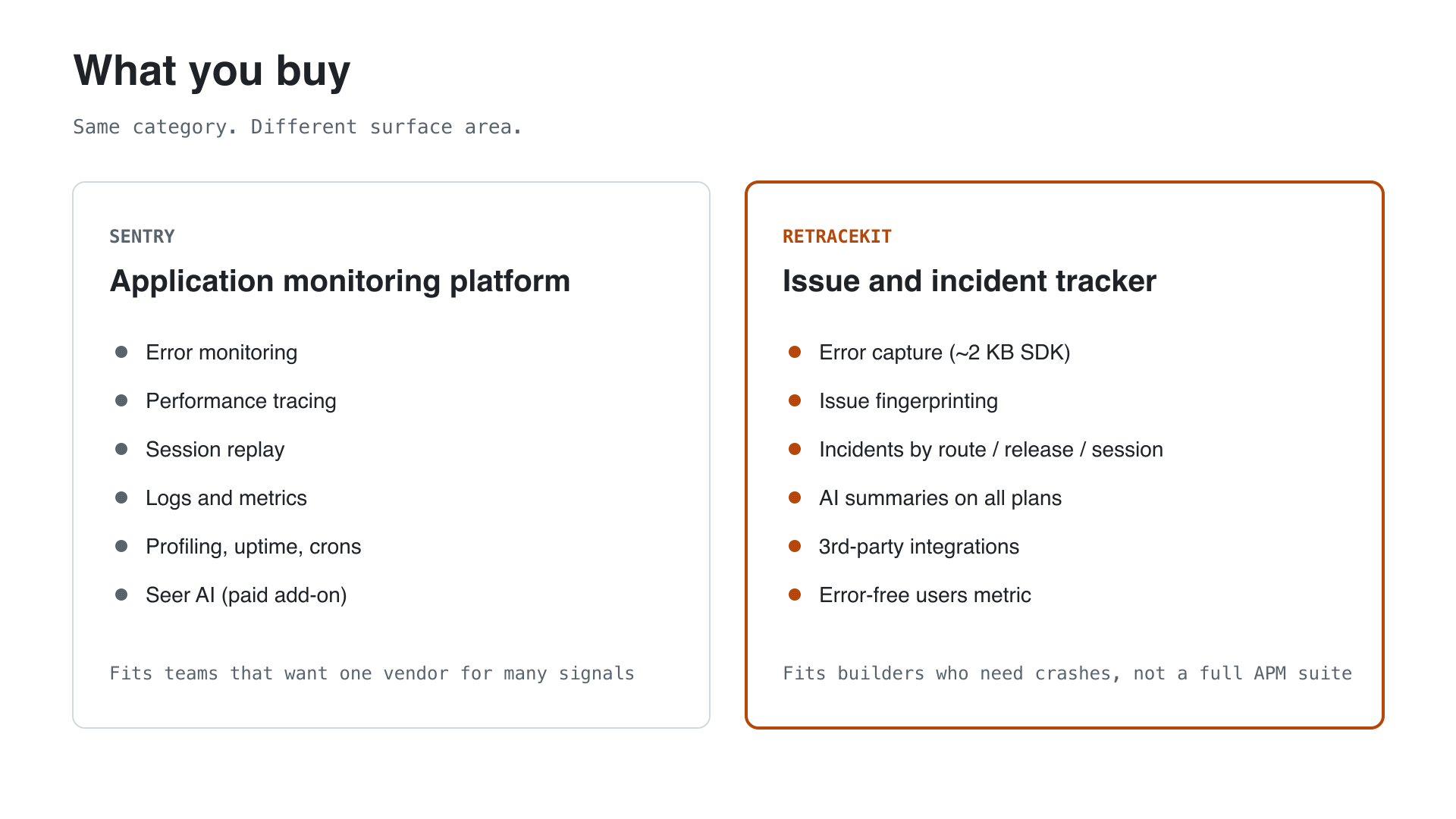
Sentry ships a full application monitoring platform: errors, performance tracing, session replay, logs, metrics, profiling, uptime, cron monitors, and Seer for AI-assisted debugging (Seer is a paid subscription on top of the plan). Teams that want one vendor for many signals get that breadth in one place.
RetraceKit ships a thinner stack:
- TypeScript SDK at about 2 KB gzipped, with automatic capture of uncaught errors
- Issue fingerprinting so identical crashes share one ticket
- Automatic incidents that cluster related issues by route, release, or session
- AI summaries on Free, Plus, and Pro, for issues and incidents
- 3rd-party integrations for alerts
- An error-free users metric for a quick health read
You triage one incident when a release lights up three fingerprints on the same route. You read the AI brief before you clone the repo. You get the alert from your 3rd-party integrations.
Fit by builder type
Indie hackers and solopreneurs. You want free capacity that survives a noisy week, a small SDK, and alerts through 3rd-party integrations. RetraceKit Free gives 100,000 stored events and AI summaries without a card. Sentry Developer gives 5,000 errors/month, one seat, and email alerts, plus access to the wider free quotas for spans and replays.
Early startups. Two to five people need a shared issue list and a place to mark an outage handled. RetraceKit Pro at $14.99/month covers 500,000 stored events, 30-day retention, incidents, and AI. Sentry Team at $26/month (annual) adds unlimited users and the rest of the monitoring suite when your team runs on that stack.
Pet projects. You need something you can ignore until production breaks. RetraceKit’s storage model and FIFO retention keep ingest open after spikes. Sentry’s monthly quota protects the free plan by dropping events past the limit until the next cycle or an upgrade.
Quick reference
| RetraceKit | Sentry | |
|---|---|---|
| Free errors capacity | 100,000 stored events | 5,000 errors / month |
| Free seats | Project-based access | 1 user |
| Entry paid plan | Plus $5.99 / Pro $14.99 | Team $26/mo annual |
| Billing unit | Concurrent stored events | Monthly errors (+ other products) |
| SDK size (browser) | ~2 KB gzipped | Full-featured multi-product SDK |
| Grouping | Issues + incidents (route / release / session) | Issues (+ broader workflow tools) |
| AI | Summaries on all plans | Seer as a paid add-on |
| Alerts | 3rd-party integrations | Email on free; integrations on Team+ |
| Scope | Error + incident tracking | Full application monitoring |
Sources: retracekit.cloud/docs/plans, retracekit.cloud/pricing, sentry.io/pricing (August 2026).
Choose with intent
Use Sentry when you want one platform for errors, performance, replay, and the surrounding tooling, and your team budgets for that stack.
Use RetraceKit when you want issue-centric error tracking with automatic incidents, included AI summaries, 3rd-party integrations, and a bill that stays under fifteen dollars for a small production app.
Start free at app.retracekit.cloud. Read the setup docs at retracekit.cloud/docs/setup.